Announcing our $950 million ceiling award to advance the Advanced Battle Management System (ABMS) for the US Air Force.
Learn More

Write Messages: Use the text input box at the bottom of the Polysentry interface to write a message. Press ENTER to send the message. Use SHIFT+ENTER to create a new line without sending a message.
Reply to Messages: Select the Reply Arrow icon next to the text input box.
Notify Teammates: Type @username to get the attention of specific team members.
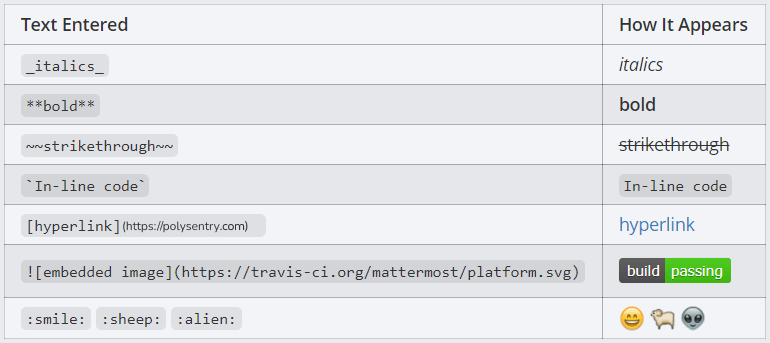
Format Your Messages: Use Markdown to include text styling, headings, links, emoticons, code blocks, block quotes, tables, lists, and in-line images in your messages. See the following table for common formatting examples.
Quickly add emoji by typing ":", which will open an emoji autocomplete. If the existing emoji don't cover what you want to express, you can also create your own custom emoji.
Attach Files: Drag and drop files into Polysentry, or select the Attachment icon in the text input box.


